Cedar

An adults-only collection journal

Cedar is a private catalog for cigar collections. It does not sell tobacco or promote its use. You must be 21 or older (or of legal age in your region) to continue.

Cedar
  • Cigar tracker
  • Cigar inventory
  • Humidor tracker
  • Cigar journal (web)
  • Cigar scanner
GuidesPricingAboutSign inGet started
Cedar/Scan a Cigar Band and Add It to Your Humidor

Scan a Cigar Band and Add It to Your Humidor

Adding cigars by hand is the reason most collections never get catalogued. Point your iPhone at the band instead: Cedar reads it, fills in what it recognises, and hands you a form to check before anything is saved.

Download for iPhone & iPadSee pricing
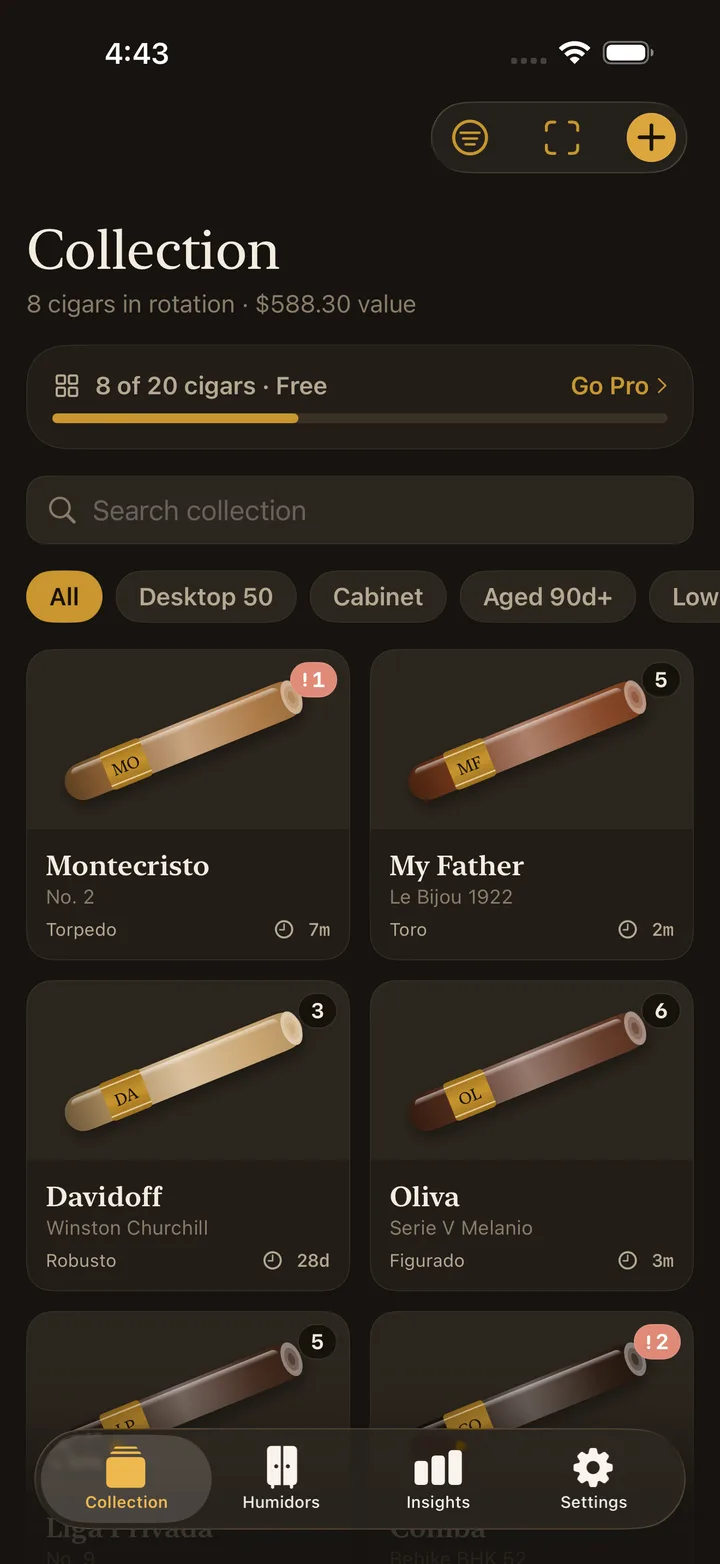
Cedar collection screen on iPhone with the scan band button in the toolbar above the cigar catalog
The scan button sits in the collection toolbar, beside add.

Why cataloguing stalls

Nobody abandons a collection app because it lacks features. They abandon it at entry eleven, because typing brand, line, vitola, wrapper, country and strength six times in a row is tedious, and a box of twenty-five is twenty-five of those.

The scanner exists to get past that. It does not make the record better — it makes the record exist.

How it works

1. Point, or pick

Open the scanner from the collection toolbar and point the camera at the band. You can also choose an existing photo, which is useful for cigars already in the humidor with the band still on.

2. Cedar reads the band

It identifies what it can from the band artwork and text, and returns the brand and line along with a confidence score — shown as a percentage, so you know how much to trust it before you look.

3. You confirm

The result opens the normal add-cigar form, pre-filled. Every field is editable and nothing is written to your collection until you save. In practice a good scan turns a minute of typing into a glance and a tap; a poor one still saves you the brand and line.

4. Add the purchase details

Quantity, price and which humidor it is going into are yours to enter, because no scanner can know them. That becomes the first lot, with its aging clock starting the day it goes in.

What it will and will not get right

Clean, current bands from well-known houses are the easy case. Worn bands, partial bands, unusual regional releases and anything where the artwork is more decorative than descriptive are harder, and the confidence score will say so.

Cedar is deliberately not designed as an identification oracle. It is a data entry shortcut with a human check at the end — which is why the form always opens rather than saving silently.

Free scans and Pro

The free tier includes five band scans. Cedar Pro makes them unlimited, with no monthly cap — a genuinely unmetered allowance rather than a large number.

Adding cigars by hand is unlimited on every tier. The scanner is a convenience, never a gate on your own records.

Questions, answered

How does the cigar band scanner work?

You point the iPhone camera at the band, or pick a photo from your library. Cedar reads the band and pre-fills the add-cigar form with what it recognised — brand, line and the details it can infer — along with a confidence score. Nothing is saved until you review it.

Is it always right?

No, and the app does not pretend otherwise. It shows a confidence percentage and leaves every field editable before you save. Worn, partial or unusual bands are the common failure case, and typing the cigar in by hand is always available.

How many scans do I get for free?

Five band scans on the free tier. Cedar Pro includes unlimited scans — genuinely unlimited, with no monthly allowance.

Does scanning work offline?

No. Reading the band needs a network connection. Everything else in Cedar — adding a cigar by hand, logging humidor readings, browsing the collection — works fully offline.

Are my photos uploaded anywhere?

The band image is sent for recognition and is not kept as part of a profile. Your collection itself stays on your device and in your own private iCloud; there is no Cedar server holding it.

Related

  • Cigar tracker: the full picture →
  • Cigar inventory: counts, lots and value →
  • Humidor tracking: humidity and temperature →
  • Compare the best cigar tracking apps →

Last updated: August 2026

Cedar

A cigar collection tracker, humidor manager and inventory app for iPhone, iPad and web. For adults 21+. Cedar never sells tobacco.

Features

  • Cigar tracker
  • Cigar inventory
  • Humidor tracker
  • Cigar journal (web)
  • Cigar scanner

Product

  • Pricing
  • iOS app
  • Web app

Resources

  • Collection care guides
  • Best cigar tracking apps
  • About Cedar
  • Contact

Legal

  • Privacy policy
  • Terms of use
© 2026 ScalingWeb Technologies